SSMB29 Globetrotter inspired Poster Editing
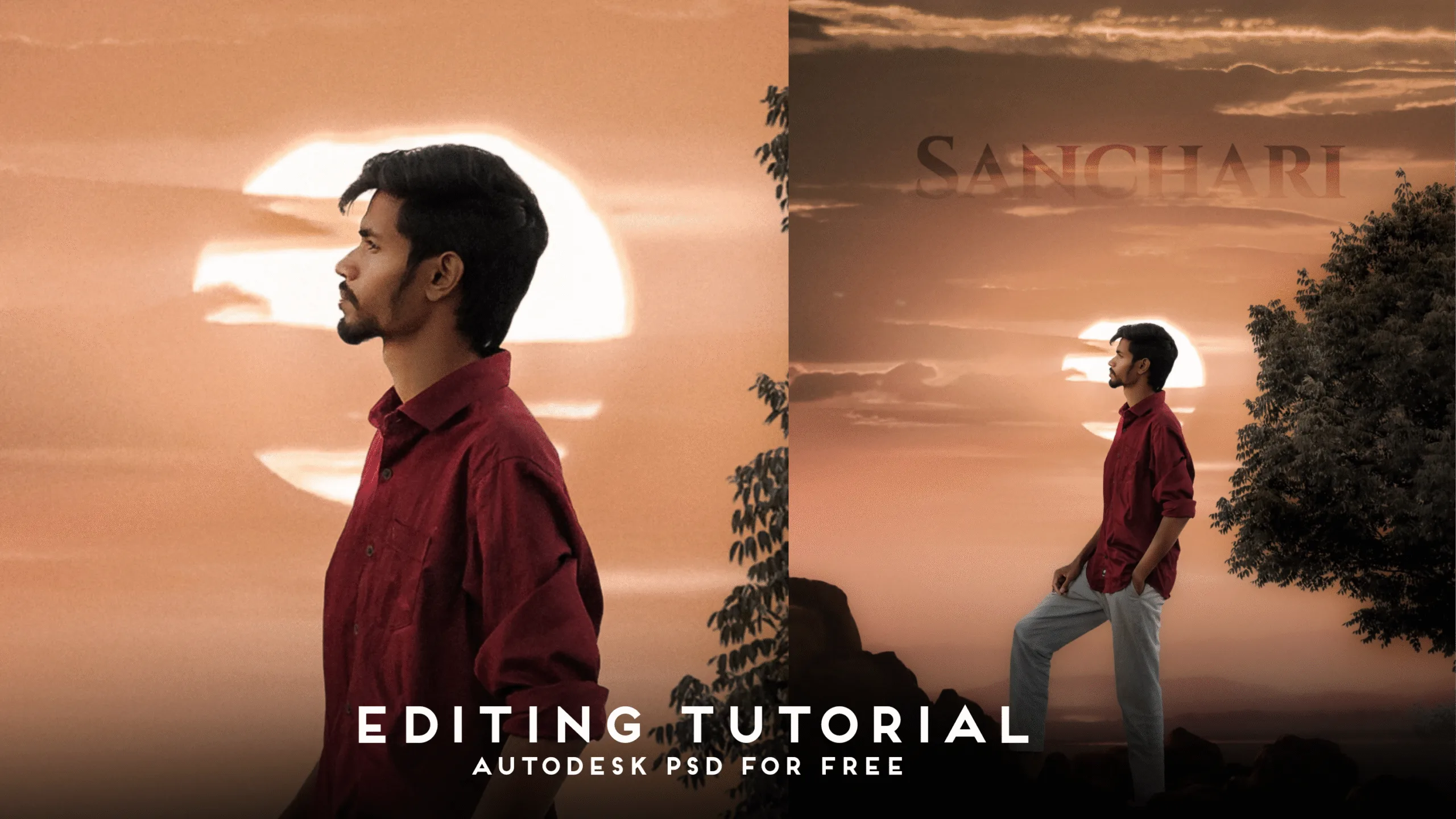
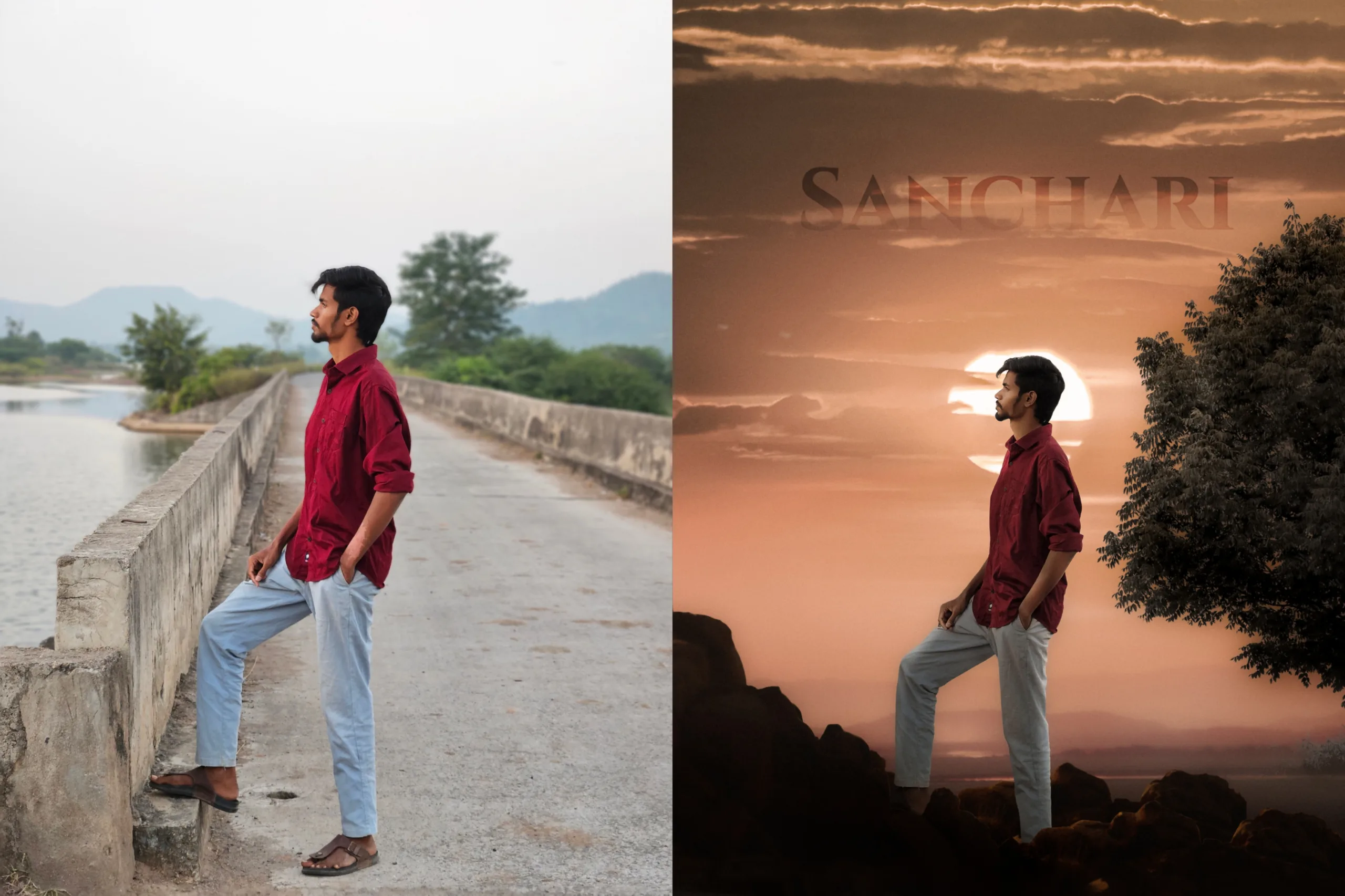
When it comes to creative photo manipulation, the beauty lies in transforming a simple portrait into a cinematic artwork. Recently, I edited a picture inspired by the newly released #Globetrotter song promo from the SSMB29 movie, and the response from my circle has been amazing.
So, in this article, I’m going to explain exactly how I created this “Sanchari-themed sunset artwork,” from the raw photo to the final graded output.
If you want to recreate the same style for your Instagram, YouTube thumbnails, posters, or personal projects, this complete breakdown will guide you through every tool, every technique, and every decision that shaped the final image.
📸 Step 1: Capturing the Base Photo
Before any editing magic begins, everything starts with a well-shot portrait.
I clicked the original photo outdoors on a bridge, keeping these things in mind:
- Natural light
- Side profile pose
- Space around the subject
- Neutral background
Even though the background wasn’t interesting, the pose, angle, and lighting were perfect for a dramatic transformation later.
This raw photo acted as the foundation of the entire scene.
✂️ Step 2: Removing the Background Using Adobe Express
The next step was to extract the subject cleanly.
I used Adobe Express for background removal because:
- It creates very clean cutouts
- It’s fast
- It preserves edge details (like hair and shirt folds)
- No manual selection required
The result was a perfect cutout of the subject standing with one leg raised, ready to be placed into a completely new cinematic environment.
🎨 Step 3: Creating the Artwork in Autodesk Sketchbook
This is where the real creativity began.
I imported a sunset landscape background, similar to the SSMB29 Globetrotter theme, and started building the scene layer by layer.
🪨 Adding Rocks & Environment Layers
To give the artwork depth and realism:
- I added foreground rocks
- Placed a tree on the right side
- Used multiple layers to build a natural environment
These elements help create a proper frame around the subject, making the composition visually balanced.
🌫️ Adding Fog & Atmosphere
Using soft brushes in Sketchbook:
- I added a light fog layer
- Softened the background
- Reduced the sharpness of the tree and rocks
Fog is one of the secrets to professional composition because it:
- Blends the elements
- Creates depth
- Avoids cut-paste look
- Matches the sunset atmosphere
👨 Adding the Subject
After preparing the environment, I placed my cutout image into the scene.
✨ Dodge & Burn
This step is extremely important for realism.
- Burn to darken the shadow areas on my body and clothes
- Dodge to add highlights where the sunset light hits
This ensures the subject blends naturally with the warm sunset glow behind.
📝 Adding the “SANCHARI” Text
To match the cinematic theme, I added a transparent SANCHARI PNG text above.
This gave the artwork:
- A poster-like mood
- Identity
- A storytelling layer
💾 Saving the Composition
After completing all the visual blending and artistic touches, I exported the image from Sketchbook for final grading.
🎞️ Step 4: Color Grading & Finishing Touches in Lightroom
Now comes the phase where every pixel comes alive.
I imported the Sketchbook-rendered image into Lightroom and worked on:
🎚️ Basic Color Correction
- Balanced exposure
- Adjusted highlights & shadows
- Increased contrast slightly
- Added clarity where needed
- Reduced harsh whites
🎭 Masking the Subject
To make the person stand out:
- I selected the subject with masking
- Increased exposure lightly
- Boosted texture and sharpness
- Highlighted skin tones
- Enhanced the shirt’s color
This helped separate the subject from the background without over-editing.
🌇 Golden Hour Color Grading
To match the Globetrotter-inspired sunset:
- Warm tones in temperature
- Orange/pink hue shift
- Vibrant sunset glow
- Soft vignette
- Slight fade for cinematic look
The final result is a warm, dreamy, travel-themed portrait — exactly what the “Sanchari” word expresses.
📌 Inspiration Behind the Artwork
This entire edit was inspired by the recently released promo image from the SSMB29 movie’s “Globetrotter” song.
The promo had:
- Warm sunset
- Traveler mood
- Cinematic composition
I recreated that vibe in my own style.
📁 Want to Recreate This Same Style? Here’s How!
I’m providing the Autodesk Sketchbook PSD file, and you can use it to recreate the exact same output.
Just follow these steps:
How to Use My Sketchbook PSD Template
- Open Autodesk Sketchbook
- Import my PSD layers
- Replace the subject layer with your own photo
- Adjust dodge & burn
- Modify fog layers based on your environment
- Save and export
- Final color grade in Lightroom
That’s it — a complete cinematic poster in minutes.
✨ Gemini Prompt to Recreate This Image
You can even recreate this artwork with AI using Gemini.
Here is the exact prompt:
“Create a cinematic sunset portrait of a man standing on rocks near a tree, with a warm orange golden hour background, fog layers, and a glowing sun behind the subject. Style it similar to a travel poster with the word ‘SANCHARI’ faintly visible in the sky. Keep the lighting soft, warm, and dreamy.”
Use this, and Gemini will generate a very close output.
SSMB29 Globetrotter inspired Poster Editing
"A person standing in profile, looking towards a dramatic sunset. The sun is a large, bright circle positioned directly behind the person's head, creating a strong backlight and a slight halo effect. The sky is filled with warm orange, red, and golden hues, with soft clouds. In the foreground, there are silhouetted rocky hills or uneven ground. A large, dark tree is positioned on the right side of the frame, partially silhouetted against the bright sky. The overall mood is serene and contemplative."
🎯 Final Thoughts
Transforming a simple outdoor portrait into a cinematic sunset artwork isn’t difficult when you know the right tools and techniques.
In this edit, I used:
- Adobe Express for background removal
- Autodesk Sketchbook for composition
- Lightroom for final color grading
- Inspiration from the SSMB29 Globetrotter promo
The combination of lighting, environment, layers, and color grading created a polished, cinematic result that feels like a movie poster.
SSMB29 Globetrotter inspired Poster Editing SSMB29 Globetrotter inspired Poster Editing
SSMB29 Globetrotter inspired Poster Editing SSMB29 Globetrotter inspired Poster Editing
SSMB29 Globetrotter inspired Poster Editing SSMB29 Globetrotter inspired Poster Editing
SSMB29 Globetrotter inspired Poster Editing SSMB29 Globetrotter inspired Poster Editing